
Junior Section 2026/27
We welcome all players from five-year olds up to 18 years old (this season we had over 400 players). Girls can play up to the Under 11 age group; unfortunately, we are not yet able to offer rugby for older girls.
The 2026/27 season runs from 6th September 2026 until mid-April 2027 (with a two-week Christmas Break). We are based in Hurlingham Park, Fulham and the sessions there are on Sundays from 10.00am to approximately 12.00 noon; if any of the age groups are playing away at another Club, that Club will determine the start time and duration.
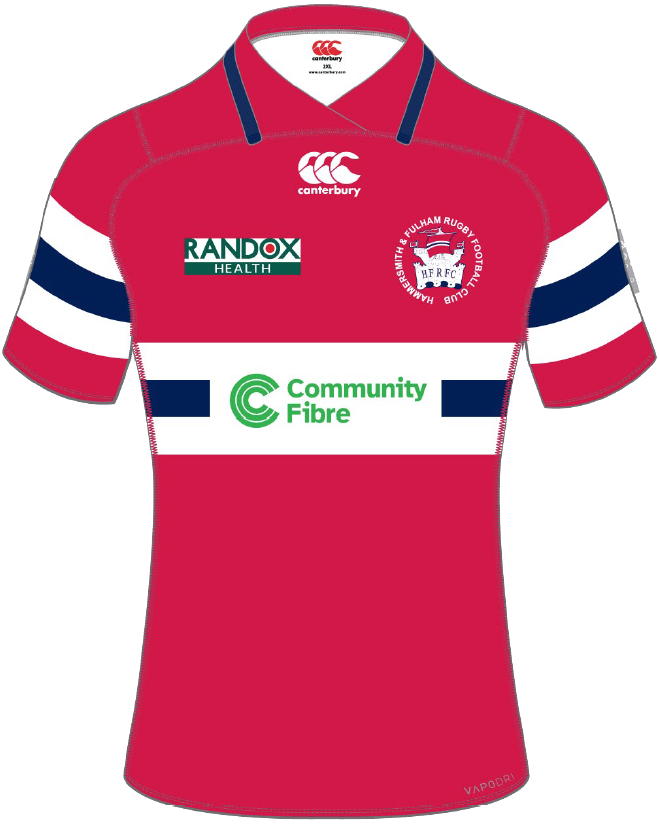
Kit can be purchased online from our partners Tacklebag where you can buy club shirts, club shorts, club socks, club fleeces & gumshields.
We also run a small coffee shop on Sunday mornings which sells teas, coffees, snacks and our world-famous bacon butties. As we are a voluntary organisation, we are always on the look-out for new volunteers; so, if you would like to help please let us know – you will be warmly welcomed by our friendly team.
Types of Membership
We offer two types of junior membership for new members: Full Membership and Taster Membership.
Full Junior Membership The membership period runs from 1st August to 31st July. (We will remind current members when it is time to renew.)
Full Junior Membership is £200.00 per season per child.
Taster Membership covers two sessions to ascertain whether your child enjoys being at the club before you commit to full membership. These sessions can be taken at any time during the validity of the Taster Membership (one month from date of purchase). If your child wishes to continue as we are sure they will, you can simply upgrade to full membership and pay the difference, so long as the taster membership is still valid.
Taster Membership is £30 per child. There is no additional weekly session fee to pay.

To ensure inclusivity, youth concessionary rates are available in the case of financial difficulty. For more information contact: juniormembership@fulhamrugby.co.uk
What next?
Once you have purchased membership, you will need to request player registration for your child which should be done at the same time as purchasing the membership. This is a vital part of the process and is an RFU requirement. Player registration gives us important information such as schools, dietary requirements, medical history, emergency contacts and consents. Player registration requests come through to us at the club and if the player is a member they will automatically be approved. We are unable to approve registration requests where there is no valid membership.
As soon as your child’s player registration request is approved, you are good to go! Please ensure you arrive at Hurlingham Park in time to make yourself known to your age group coach before training commences at 10am. One of our volunteers will be on hand inside the clubhouse get you settled and answer your questions.
Your child will be allocated to an age group depending on their age as at 1st September 2026 eg if they were six at that date they will be allocated to our Under 7s, where they will remain for the year. Please note that this allocation is strictly adhered to and cannot be varied.
Please note that all junior players must have a valid membership for the current season (either Taster or Full membership), and must be registered as a player before they are permitted to participate in any club activity.
Membership will be available on 15th August and details of how to sign up will be shown here.
New Members – How to Join
We use the RFU’s Game Management System (GMS) for all our membership and player registration admin.
Youth players must be signed up through the RFU game management system (GMS). All youth accounts must be created in the name of a lead adult. If you do not already have a GMS account, you will need to create one for yourself and add your child/children. Simply click the relevant button below to create an account or log in.
A player’s GMS account will form their rugby record and will follow them through through playing career and on into senior rugby, whether they remain with H&F RFC or relocate to another club, so it is important that all details are kept up to date. All data is retained and managed by the RFU in accordance with strict GDPR and safeguarding guidelines.
Joining as a junior member is a four stage process.
Youth players must be linked to a parent or guardian. Please read through this information and then use the link below to create an account for yourself within GMS or to log into your existing GMS account
You will probably already have a GMS account if you have played rugby either at H&F or another club and been a registered player, or if you have any coaching qualifications. This may have been set up for you by a previous club. If you try to create an account and find that you already have one but don’t know the login details, please do not try to create a duplicate account. Contact us at admin@fulhamrugby.co.uk Please note this email address is for GMS technical issues only.
For general enquiries about junior membership, contact juniors@fulhamrugby.co.uk
When you have finished setting up your account and verified your email, you will have your own GMS dashboard page from where you can add other family members.
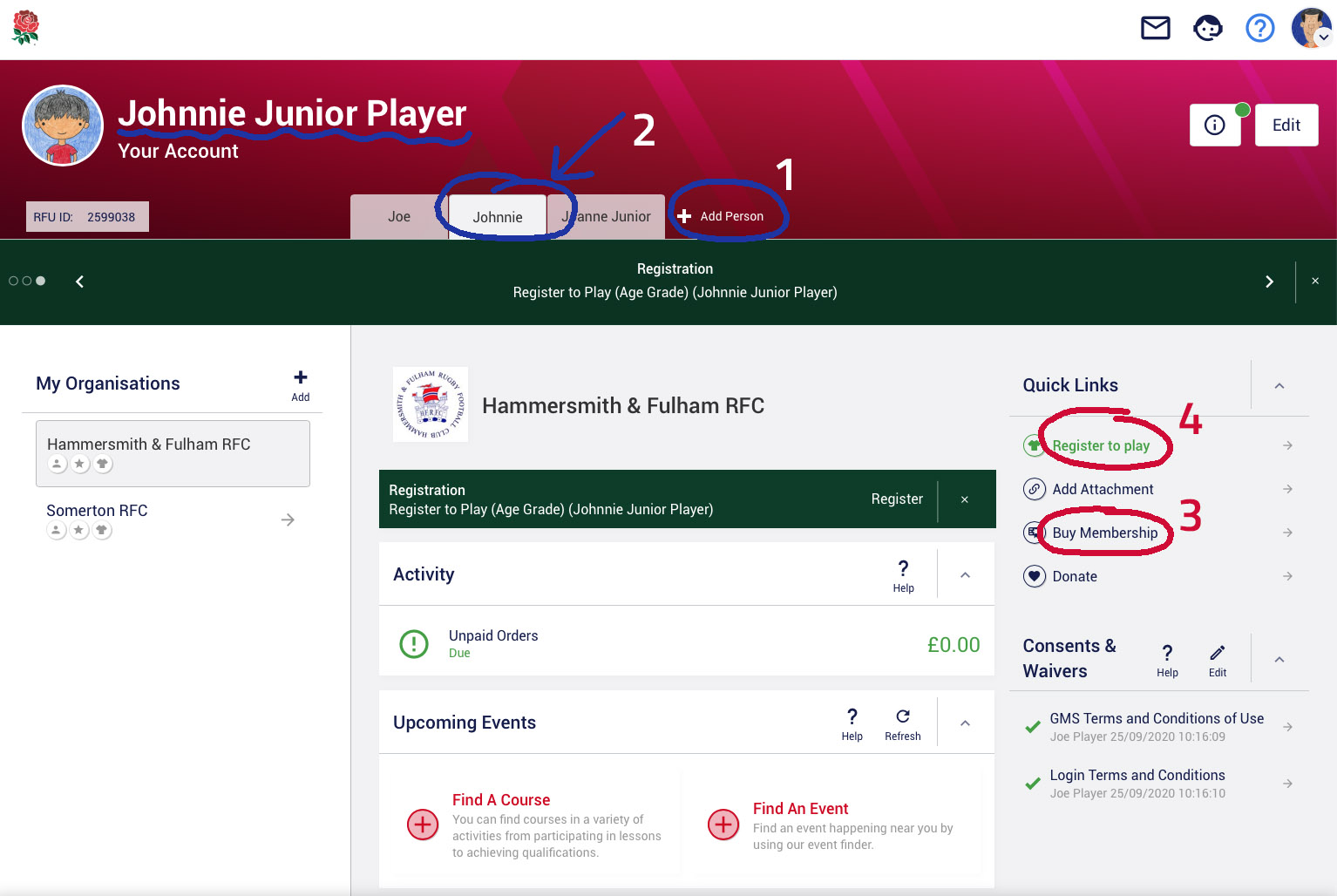
1. Add the junior player
Click “+Add Person” next to the tabs at the top of your dashboard page to add a youth player. If you have more than one child, please add them all at this stage, providing the information requested. Any youth players you add will appear as a tab at the top of your page and your dashboard screen will look like this…
2. Switch to child’s account
Click on your child’s tab to switch to their dashboard page and account details.
3. Purchase Membership
Click the “Buy Membership” link under Quick Links on the right. This will offer you all memberships appropriate to the age and gender. Simply add the membership you require to your basket (and, if you would like to, make a donation to the club to help us maintain our excellent standards, by adding the £10 donation to your basket!) Then click on your basket (top right) and proceed to payment.
4. Request Player Registration
All youth members must also be registered as players. This is not the same as membership, it is an RFU requirement. Without this, they are not permitted to participate in club activity. To request registration, go back to the child’s dashboard by clicking their tab at the top of the page and click “Register to Play” link under Quick Links. You will be asked to provide emergency contact details, any relevant medical or dietary information and consents.
It is vital that you follow step 4 since players are not permitted to participate in any club activity unless they are registered as a player.
You will be notified by email when the request to register as a player has been approved.

Please select which age group you would like to join
Already a member? Log in here
Little Hammers (U6)
Players must be five years of age on date of joining
U7s
Players must be six years of age on 1st September 2023
U8s
Players must be seven years of age on 1st September 2023
U9s
Players must be eight years of age on 1st September 2023
U10s
Players must be nine years of age on 1st September 2023
U11s
Players must be ten years of age on 1st September 2023
U12s
Players must be eleven years of age on 1st September 2023
U13s
Players must be twelve years of age on 1st September 2023
U14s
Players must be thirteen years of age on 1st September 2023
U15 – U18
Players must be at least fourteen years of age on 1st September 2023
Terms & Conditions
Junior registration and payment is via the RFU Game Management System (GMS).
Children (players) may only be registered for the Hammersmith & Fulham RFC Junior Section by one of their parents or a legal guardian. To comply with Rugby Football Union (RFU) regulations, youth players must be aged between five and 17 on 1st September 2026. Players aged 18 and above on that date should join our Senior Section.
Players under the age of 18 may not play for the club unless they have been registered via GMS and hold a paid membership. Please ensure you tick the player registration box and provide the details requested as we are unable to register a player with the RFU until you have done this and verified your email address.
By registering a child, you are agreeing that you and the child will be bound by the club rules and policies.
Please ensure that you agree to all three consents during the registration process: photography, emergency contact information and medical details. Your child will not be able to play for the club unless all three consents are given.
For information about how we and the RFU use your personal data please see our Privacy Notice.
For general information or questions about youth membership please email: juniormembership@fulhamrugby.co.uk
PRINCIPAL SPONSORS


CLUB SPONSORS




Club Partners




Club Suppliers